
Ransomware – To Pay Or Not To Pay?
Ransomware such as WannaCry is used to extort money from people and organisations who are told that their important data is locked away until they pay a ransom. If you become a victim of ransomware, should you pay? Even if you do, will you get all of your data back?
Experts Say ‘Don’t Pay’
The WannaCry global attack has reportedly led to over 126,000 ransomware infections worldwide. PC users have been advised to update Windows to ensure that they are protected.
When vital and possibly irreplaceable data has been “lost” through forced encryption, £230 may seem like a small price to pay, but the expert advice for those affected by ransomware is ‘don’t pay’.
Some people seem to have been more than willing to fork out the money, according to a Twitter bot tracking the digital wallets set up to receiving the ransom, which is paid in Bitcoin. To date, £39,000 appears to have been paid to the attackers.
Returning Your Data Intact, Unlikely With WannaCry
However, the bitter truth is that even if you do pay the ransom, the actual chance of them being able to regain access to your files is probably next to nothing.
Aside from the fact that an honest transaction is not a given when dealing with criminals, WannaCry does not seem to have been built in a way that actually facilitates the efficient return of data access. Manual action will need to be taken to activate decryption (which looks unlikely to happen), and a viable decryption method may not even be a part of WannaCrypt’s code
even if victims pay to request a key to restore access, many security experts agree that, in reality, victims are unlikely to receive any response after paying.
What Does This Mean For Your Business?
In the case of WannaCry, although the global spread was huge, many home and business computer users are likely to have automatically installed a Microsoft update / patch that provides some protection.
The advice from many security commentators for those businesses unfortunate enough to suffer a ransomware attack is not to pay the ransom. Not only is it unlikely that you will get all of your data back if you do pay (some ransomware deletes files anyway), but you are unlikely to receive the key that will unlock your files, or indeed, any response at all from the people you pay the ransom to.
The best advice for businesses must surely be to be prepared and take security measures to ensure that your business is adequately protected in the first place against the known methods of malware (including ransomware) attacks. Investing in security now and in keeping security systems up to date is likely to be much better and more cost effective than paying ransoms, paying for disaster recovery and suffering the effects of business disruption, lost customers, and reputational damage that are the results of successful cyber attacks.
Sensible measures that businesses should take include taking regular and secure back-ups of your important files and data on a separate (secure) drive, machine, or in the cloud, the training of staff in spotting and dealing with cyber security threats, keeping software updated and patched, focusing on risk assessment and management, conducting penetration tests, tightening of data protection, having Disaster Recovery and Business Continuity Plans in place, and having a focus from the top down on IT governance and increasing cyber resilience.
Hunt for WannaCry Ransomware Attackers
As organisations around the world recover and begin to count the cost of the biggest ransomware attack in history, cyber security and law enforcement agencies around the world have turned their attention to tracking down the perpetrators.
Cruel Irony
The irony of the WannaCry ransomware attacks is that it exploits a vulnerability that was identified by the US National Security Agency. The vulnerability is a hacking tool called ‘Eternal Blue’ that gives access to Microsoft Windows, and was originally developed by the NSA to access the computers of suspected terrorists.
Tracking Gangs
It has been reported that security companies and agencies have analysed the malware and are tracking over 100 different ransom Trojan gangs, with no success as yet.
The ransomware first appeared on 10th February this year and was then used two months later in a short ransomware campaign.
Almost no one fell for version 1.0, which used spam email and booby-trapped websites. However, version 2.0, which incorporated a single additional module to make it self-replicating, wrought much more havoc over the weekend.
Clean Launch Means No Clues
One factor that has frustrated the search for the WannaCry perpetrators is the absence of any real clues in the way that the ransomware code has been written and launched. For example, there were no clues based on strings of characters in the executables or whether it was uploaded to Virus Total to check for detections before distribution.
The relatively ‘clean’ launch of the ransomware has, therefore, meant that there are no real pointers as to which group is responsible for its creation and launch.
Probably Not the Russians
The ransomware does not seem to hesitate when infecting machines running Cyrillic script and systems in Russia, which has led security commentators to believe that the Russian State is unlikely to be responsible.
In addition, timestamps on the code show that it may have been created on a machine in a +9 GMT timezone – Japan, Indonesia, Philippines are part of this zone, as well as far eastern parts of China and Russia.
One of the other clues that hint to the creators being a new group is, ironically, the success of the malware. WannaCry has hit far more than the usual number of victims targeted by ransomware aimed at large organizations.
The huge number of victims makes ransom management very difficult.
WannaCry’s Achilles Heel
Another clue is the failure to register the domain written in its core code. By not doing so, the creators unwittingly crippled the malware by allowing security researcher Marcus Hutchins to register and take over the domain, limiting its spread.
Other methods that have been used to administer infected machines like the Tor dark web network are being monitored for activity.
Other useful artifacts in the code like a kill-switch domain may have provided clues e.g. to see if it was queried before WannaCry was distributed, but it is also worth noting that criminals sometimes put deliberate false flags in the code to confuse and frustrate attempts to crack it.
Following the Money
To make it easy for criminals to track ransoms and restore only the files of obliging victims, large-scale ransomware campaigns usually generate unique bitcoin addresses for every infection.
In contrast, WannaCry created only three hard-coded bitcoin addresses for ransom payments.This makes it difficult to keep track of who has paid, which calls into question the creators’ intention – or ability – to actually restore locked files, even if the Bitcoin payments are made.
However, Bitcoin is not as anonymous as most criminals appear to believe. Every bitcoin transaction is publicly recorded in the blockchain, creating a spending log, and analysis of transactions on the blockchain can help investigators follow the flow of money and hopefully lead them to the criminals.
Collecting The Money
All eyes are now on where/when the money is collected by the criminals (to provide a clue) plus any possible leads as to WHO actually collects the money. The total amount of ransom paid so far is estimated at £39,000, which many commentators have noted is a relatively small amount of money for a crime of this scale.
What Does This Mean For Your Business?
The massive ransomware attack that infected the computers of an estimated 300,000 victims in 150 countries worldwide, many of them large, well-known businesses and organisations (including 16 health service organisations in the UK) has been a massive Internet and data security wake-up call.
Internet and data security, particularly with GDPR due to come into force next year, must surely now be given high priority by businesses and must be championed at board level.
The danger and false economy of staying with old operating systems as long as possible has been painfully exposed in this attack.
One piece of sheer luck with the WannaCry ransomware is the fact that the domain written in its core code had not been registered, and a security researcher was, therefore, able to stop its spread by registering the domain himself. It is highly likely though that there will be more, large-scale ransomware attacks in the near future, and for businesses, relying on luck and minimal preparation is not an option.
Businesses need to take a range of measures to ensure that they are well defended against known cyber threats, and prepared for the aftermath, should defences be breached. Preparations could include making sure that all the latest updates and patches are installed on systems and that anti-virus software is up to date, all important data is regularly and securely backed-up, all staff are trained to spot and deal correctly with potential threats, and workable Disaster Recovery and Business Continuity Plans are in place.
Tech Tip : Snap Windows For Multi-Tasking
Windows 10 has a handy feature that allows you to snap the current window to one side of your screen, and simultaneously open a second one on the other side, thus enabling the often elusive multi-tasking. Here’s how:
To activate the feature and to enable you to effectively pin different apps to either side of the screen, its just a case of pressing Win and the right / left arrow key. You can just scroll through the windows without clicks.
Try:
- Win + 1 — first app
- Win + 2 — second app, and so on.
Ransomware cyber-attack , What you need to know
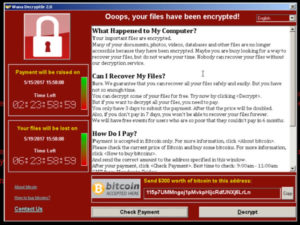 Over the last 48 hours a new strain of Ransomware is attacking computers across the world, it has been most successful in Russia and the UK and experts expect that on Monday a new wave of attacks will hit the UK.
The payload is triggered from an email attachment or from an infected website that you are directed to from social media or again from an email. What makes this Virus so powerful is that is uses a exploit on a un-patched windows machine to spread to every other computer on your network that has not been patched.
Microsoft has been aware of the exploit since March and as such released a hotfix to close the vulnerability, however computers that have not enabled automatic updates will still be vulnerable and will spread the Virus to any other computer on your network that has not been patched.
What to do if your machine is infected
The most important thing to do is turn of any infected computers right away .
We would also suggest turning of all other computers on the network at this time and calling your IT support ASAP. if it can be caught at this point your recovery will be a lot easier. The sooner your IT knows the better it will be. Do not email, call them. if you have no IT support then make sure you have good backups.
To remove the virus from your machine yourself take a look here
What can you do to protect yourself
We have written up a list of things you can do to protect yourself and check if you have the required patch installed
If your computer is part of a Business network then the only way you will be infected is if you open up an email containing the Virus payload, or by following a link to an infected site. For the next few week we suggest all users become suspicious of all attachments and links from 3rd parties or from organisations you are not expecting emails from. You can always check with your IT Support anything you are unsure on.
Speak with your IT Support and ask them to confirm that the update has been installed, if your server is managed by RG computers then this has already been done.
by default Windows 10 has automatic updates enabled and so you should already have the patch installed . but if you want to check
- click the start button and type windows updates
- click on windows update setting
- it should say:
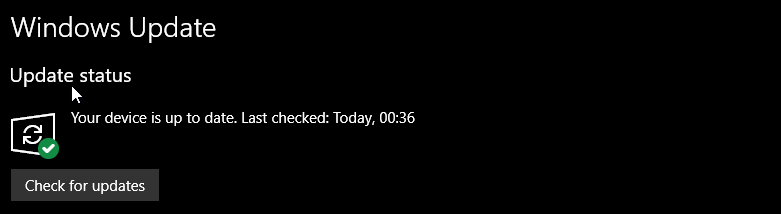
If your updates are not working, then speak with your IT Support to look into this.
- Click Start, click All Programs, and then click Windows Update.
- In the left pane, click Change Settings.
- If the Important updates setting is set to Never check for updates (not recommended), Windows Update is turned off. To automatically download and install important updates, click Install updates automatically (recommended).
- Under Recommended Updates, click Give me recommended updates the same way I receive important updates, and then click OK.
Other things to check
- Update your Antivirus software definitions. Most AV vendors have now added detection capability to block WannaCry.
- If you don’t have anti-virus software enabled on your Windows machine, we recommend you enable Windows Defender which is free.
- Backup regularly and make sure you have offline backups. That way, if you are infected with ransomware, it can’t encrypt your backups.
- For further reading, Microsoft has released customer guidance for the WannaCry attacks and Troy Hunt has done an excellent detailed writeup on the WannaCry ransomware
The second wave of attacks appears to have just started within the past few hours. This is going to be a rough week for Windows users. We recommend you speak to all your friend and work collages to check the above.
Touch Sensitive “Paint” Opens New Doors
A new system called Electrick (developed by Researchers at Carnegie Mellon University Pittsburgh) uses conductive spray paint and electrodes to turn any surface into an electronic touch sensor.
Electric Field Tomography
The revolutionary new system was created by Created by CMU Ph.D. student Yang Zhang and works using a technique known as electric field tomography (EFT), which exploits the interaction of a high-frequency electric field with a conductive medium.
How Does It Work?
In short, a surface or object is coated with a spray-paint application of carbon conducting paint. N.B. whole, solid or pliable objects can also be cast / moulded from carbon-conductive material (a mixture of carbon fibre and conventional silicone).
The surface or object then has electrodes attached to the periphery, and a small current is then injected in. The field and direction of the current is rotated around so that it covers the whole surface or object with no blind-spots.
When a person touches or runs their finger along the flat / object surface, the exact location can be plotted by a computer / computerised gadget. This means that all areas of the surface can be made touch sensitive (as in a touch-screen for a tablet), and individual touches can then be used to e.g. launch specific applications or activate features (such as sound effects).
What Can It Be Used For?
As is usually the case with technological innovations, the real potential and multitude of possible applications are only realised later on and depend upon the needs of the user of the technology and the niches that have been spotted by businesses. Examples of possible applications identified by Electrick, which can be seen in their video here https://www.youtube.com/watch?v=38h4-5FDdV4 include:
- Making inexpensive flat touch-panels or touch sensitive 3D shapes by sticking conductive-coated surfaces to Velostat or by laminating it to thermoformable sheet.
- Adding functionality to 3D printed objects and prototype objects to test them and improve their design.
- Making a whole table surfaces touch-sensitive and able to e.g. launch computer programs and apps.
- Making wall surfaces act as ‘dimmer-switch’-style controls for the wall / room lights.
- Enabling the activation of guitar / musical instrument effects to linked to touching a single part of the instrument’s surface.
- Adding sound effects to touch locations on e.g. toy figures, education / teaching aids.
What Does This Mean For Your Business?
This new system represents a real opportunity for businesses, particularly in manufacturing, to improve and augment existing products, create new and innovative products, and improve the R&D and testing processes while keeping costs down. This low-cost, relatively easy way to create touch surfaces on any scale could help to revolutionise services e.g. information delivery and aid the advancement of automation. The possibilities are potentially limitless and could provide countless business opportunities for those who can quickly identify an area within their own business or industry where use of the system could add value, reduce costs, simplify processes and save time, or provide greater convenience and value to customers / end-users.
Broadband Speed Claims To Be Examined
Broadband Speed Claims To Be ExaminedA 10-week public consultation is to be held by the Advertising Standards Authority (ASA) and the Committees of Advertising Practice (CAP) about the advertised speeds of competing broadband services and whether they differ from real user experiences. Why? It has been reported that Research commissioned by the ASA has led CAP to believe that tougher standards need to be imposed on broadband providers to make them clearer, more transparent, and more realistic about exactly what they are offering, and what consumers can realistically expect from their services. Also, since big changes in technology and the tech marketplace can happen quickly, and the current guidance on broadband advertising was introduced back in 2012, the advertising regulators think that it’s now time for the guidance to be updated. At the current time, and based on those 2012 guidelines, ISPs only need to advertise the maximum speed claims achievable by at least 10% of customers, which need be preceded by the words ‘up to.’ What Could The Consultation Mean? The indications are that, even prior to the consultation, the advertising regulators may be thinking about making ISPs disclose clear information about peak-time median download speeds, 24-hour national median download speeds, the range of peak-time download speeds, and 24-hour national download speeds (available to the 20th to 80th percentile of consumers). This would require companies who want to make specific claims about their broadband speeds to instruct end-users to check with their broadband provider what actual speed they are most likely to receive. How Do You Know What Your Real Broadband Speed Is? To find out what your real broadband speed is, you can use websites such as http://www.broadbandspeedchecker.co.uk/ (which will give you separate download and upload speeds), or the Which? Broadband speed test page: http://www.which.co.uk/reviews/broadband-deals/article/broadband-speed-test You can also look at the details published on broadband comparison websites like The Consultation CAP say that, over the next 10 weeks (which critics think is a quite a short time period), they will be inviting views on four options for change, and remaining open to any other options that better manage consumers’ expectations of the likely real broadband speed that they could receive. What Does This Mean For Your Business? In a week when Virgin Media Business has announced the introduction of its ‘Voom’ 350Mbps broadband for SMEs (which in reality is at least 200Mbps), there is still a lot of confusion in the marketplace about the subject. Fast connections are vital to UK businesses. Virgin’s own commissioned research, for example, showed that if the UK’s digital potential was fulfilled (which includes faster broadband services) the UK’s GDP could increase by more than £90bn in just over two years. If the consultation and the resulting guidelines cause providers to be more transparent about what business customers can realistically expect from broadband providers, this has to be a good thing. Critics point out that physical distance issues play an inescapable part in broadband speeds, and simply switching to another broadband provider that is using the same technology as your current one may not improve matters anyway. |